

A Lean Stage Gate Process for Project Requests
A lean stage gate process for project requests: how many gates to use, what each one requires, and how to stop gates turning into rubber stamps.
A stage gate process splits incoming work into a few phases, each ending in a gate: a point where someone with the full picture decides whether a request moves on, goes back for more information, or gets killed. It was built for new product development, where a five-gate model makes sense for a multi-million-euro launch. Most teams fielding project requests, ideas or proposals need far less. Two or three gates, sized to a $20,000 request rather than a $2,000,000 one, is usually enough. This guide walks through a lean version you can set up this week, with the criteria and reviews that make each gate mean something instead of a rubber stamp.
Why most stage gate processes stall
Ask around and the same complaint comes up. The gate meeting gets scheduled, half the reviewers don't show, and the request slides through anyway because nobody wants to be the one holding it up. Or a small internal request gets dragged through the same five gates built for the company's biggest launch, so people quietly route around the process instead. Both failures trace back to the same mistake: the gates are sized for the biggest project the team has ever run, not the one in front of them.
The fix isn't more governance, it's less friction. A gate doesn't have to be a meeting. It can be a decision backed by a scored set of criteria and a confirmed review, made whenever the person responsible gets to it, within a day or two, instead of whenever six calendars line up.
A lean three-gate model for request intake
Picture an IT team getting around 25 project requests a month. Three people split the scoring, one architect reviews feasibility, and someone from finance checks the business case. That's enough structure for three gates.
- Gate 1, Triage. Entry: the request is submitted. Exit rule: within two business days it's sorted into advance, decline, or hold for more information. No scoring yet; this gate just keeps obviously out-of-scope requests from clogging the rest of the process.
- Gate 2, Business case & scoring. Entry: advanced from triage. Exit rule: scored against every weighted criterion, with the architecture and finance reviews confirmed, not just drafted. This is where most of the real work happens.
- Gate 3, Portfolio decision. Entry: gate 2 complete. Exit rule: approved or rejected, with a short written motivation that gets logged and, if you tell requesters the outcome, emailed to them.
Gate 1 only works if requests actually arrive somewhere consistent instead of scattered across inboxes and chat threads; our guide to building an intake process without bottlenecks covers that front end in more detail. For the scoring at gate 2, four criteria is usually plenty for a lean model: strategic impact, cost efficiency or ROI, delivery effort and risk. Weight them so they add to 100. Strategic impact 40, cost efficiency/ROI 25, delivery effort 20 and risk 15 is a reasonable starting split for a team that cares about strategic fit first and feasibility second. Rate each on a 1 to 5 scale, where 1 means the request clearly doesn't meet the bar on that criterion, 3 is adequate and 5 means it's an unusually strong case. We cover choosing and weighting criteria in more depth in our guide to weighted scoring models.
Make the gate a decision, not a meeting
The single biggest change that keeps a stage gate process alive is dropping the live review meeting in favor of a deadline. Give the architect and the finance reviewer three working days to confirm their review once a request lands in gate 2: no meeting, they just read the request, fill in their review, and confirm it. The gate owner checks the request once both reviews are confirmed and every criterion is scored, then makes the call. Nobody waits for six calendars to align, and nobody lets a request through simply by not showing up.
This only works if a review stays visibly unfinished until someone signs off on it. A half-filled review sitting as a draft is not a completed gate, and a request scored by one person wearing two hats isn't reviewed twice. A gate that needs an architect's view and a finance view needs two separate reviewers on the same request, which on most intake tools, and on Admitura's Free plan (a single reviewer seat, the owner), means a paid tier that supports more than one reviewer per request.
Setting this up in Admitura
Admitura's starter workspace ships with a Project Intake template close to this shape already: stages New, Business Case Review, Prioritization, Approved/Rejected, with scoring criteria weighted at strategic impact 40, cost efficiency/ROI 25, delivery effort 20 and risk 15. Here's how to adapt that, or build the model above from scratch.
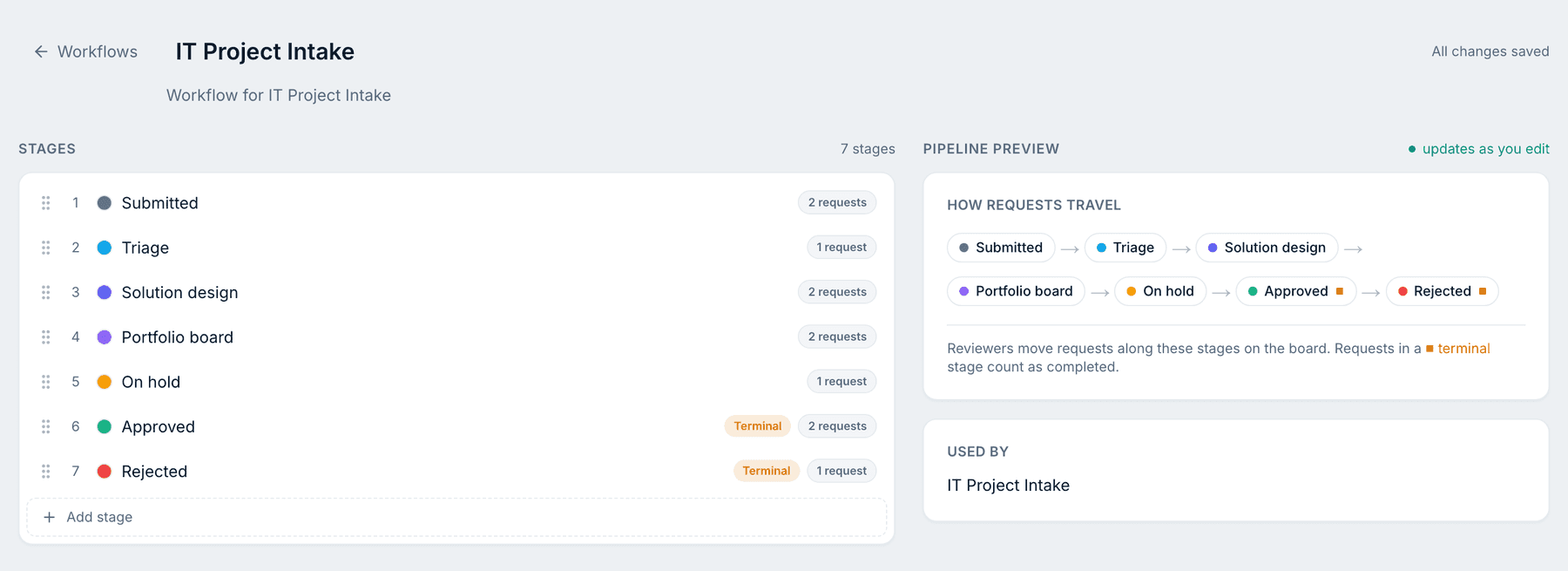
- Go to Workflows and lay out your stages in order: Triage, Business case & scoring, Portfolio decision, then your terminal stages (Approved, Rejected). Mark which ones are final decision stages. Admitura shows a live preview of how requests will travel between them as you build it.
- Go to Scoring and set up your gate 2 criteria and weights, so they total 100.
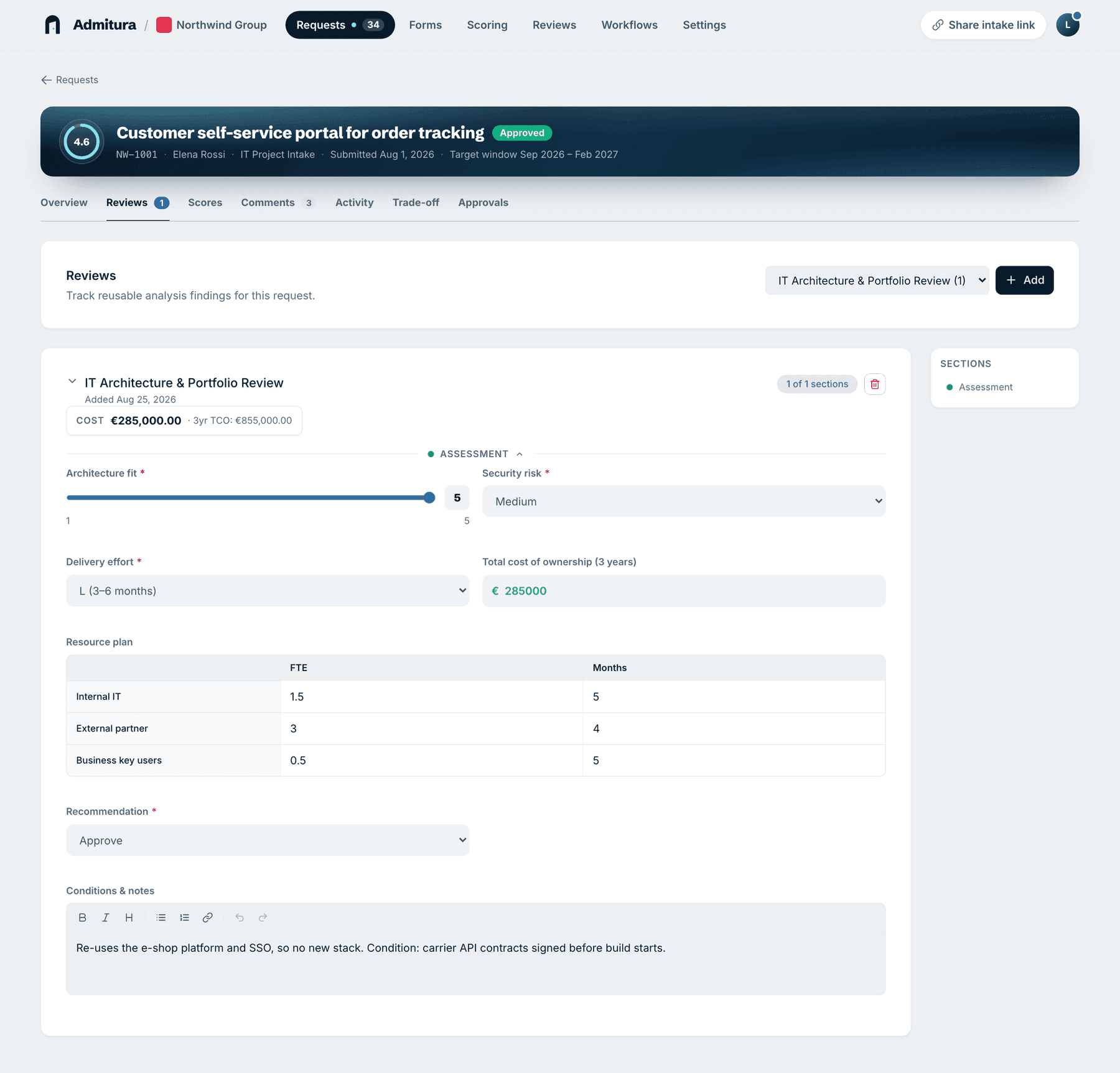
- Go to Reviews and build a review form for each specialist check your gate needs, such as an architecture review or a finance review. A review stays a draft until the reviewer confirms it, which is exactly the "not actually reviewed yet" signal a gate needs.
In the example workspace, an IT Architecture & Portfolio Review captures architecture fit, security risk, delivery effort, a total cost of ownership figure and a resource plan, ending in a recommendation to approve or not, with notes:
- Once every criterion is scored and the reviews you need are confirmed, move the request's stage from the Stage panel on its detail page. Moving it into a final decision stage asks for a short motivation, which is kept in the stage history and, if decision emails are turned on, sent to the requester.
Teams that want a gate literally blocked until named people sign off can set that up with approval gates on Admitura's Enterprise plan. Worth knowing about, but most teams running a lean model don't need it to get a real gate.
Common mistakes
- Copying a five-gate product-development model for requests closer to $20,000 than $2,000,000.
- Letting a gate pass by default because a reviewer didn't get to it. A missing review should block the gate, not waive it.
- Scoring the easy criteria, cost and effort, and skipping the one that takes judgment, strategic fit, because it's the one people disagree on.
- Treating the gate decision as the end of the story instead of logging why a request passed or died, so the next similar request starts the argument from zero.
- Bolting on a new checklist item every time one gate goes wrong, until the process is heavier than the problems it's supposed to catch.
FAQ
How many gates does a small team actually need? Two or three: a triage gate to filter obviously-wrong requests, a scoring-and-review gate to build the case, and a decision gate. Five gates is a model for large capital programs, not a 25-requests-a-month team.
What if nobody attends the gate review meeting? Stop scheduling one. Set a deadline for each reviewer to confirm their review on their own time, and treat an unconfirmed review as a reason the gate hasn't been passed, not a formality to skip.
Is a stage gate process the same thing as an approval workflow? They overlap but aren't identical. A stage gate process is about building a case, scoring and review, before a decision is made. An approval workflow is about who has to formally sign off once that case exists. You can run gates well without a formal sign-off step; some teams add one on top once decisions get expensive enough to need it.
Can I run this in a spreadsheet instead of a tool? You can start there, but a spreadsheet can't hold a confirmed review, a weighted score and the decision history on one record. Those end up split across a sheet and some email threads, which is the gap intake software closes.
Admitura keeps a request's stages, scores, reviews and decision history on one page instead of scattered across a spreadsheet and your inbox. Try it free.
Sources: projectmanagement.com discussion, "Where can I find resources for stage-gate information"; projectmanagement.com discussion, "What should you do when key stakeholders don't attend your meeting"; projectmanagement.com discussion, "Project gate review case study", checked 2026-10-16.